UAV pilot training:
aircraft, simulator and review.
By Verniq UAVs Private Limited ? Updated
A UAV pilot-training system combines repeatable simulator practice, an appropriate training aircraft and review of each session. Verniq offers the Recon TR-01 aircraft and a simulator demonstrated in its launch film.
Which Verniq platform fits your training objective?
Start with the skill you need to develop. Pilot practice and autonomy research place different demands on the hardware, software and instructor workflow. The Recon TR-01 and Edu-Stack serve different purposes.
| Option | Primary purpose | Published features |
|---|---|---|
| Recon TR-01 | Pilot training and aircraft familiarization | 900 g MTOW, published 23-minute endurance, GPS-assisted flight and swappable battery. |
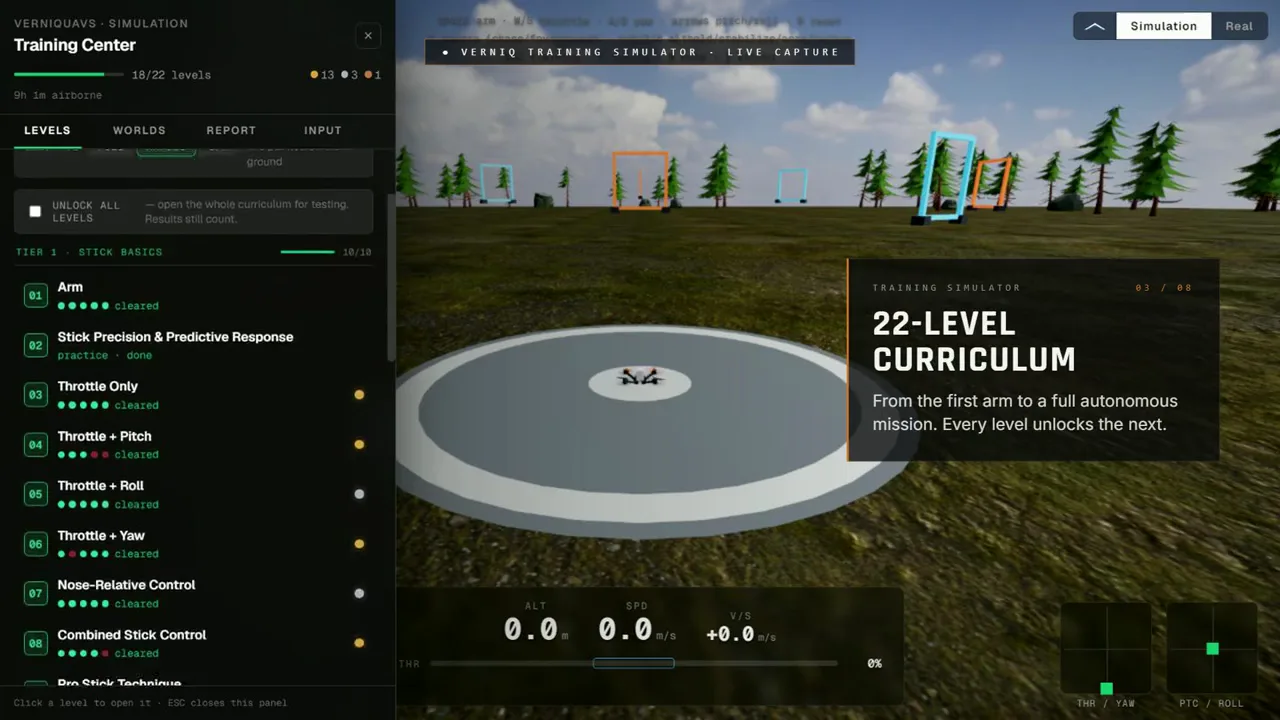
| Verniq training simulator | Repeatable practice and session review | 22-level curriculum, controller input, scoring, coach notes and flight replay shown in the launch film. |
| Edu-Stack | University autonomy and perception research | ROS 2, PX4 SITL, camera/IMU sensing and configurable onboard compute listed in the catalogue. |
Aircraft endurance depends on configuration and operating conditions. See the Recon TR-01 brochure for published specifications and discuss your intended training environment with the team.
What can learners practise in the simulator?
The Verniq launch film shows Loiter, AltHold, Stabilize and Acro modes, alongside lessons that progress from arming and stick control to autonomous missions. Scores, coach notes, flight replay and a stick-input timeline support review after a lesson. Keyboard, gamepad and compatible USB RC-transmitter inputs are shown.
Simulation makes it practical to repeat a task and compare successive attempts. It cannot reproduce every aircraft, weather condition or equipment fault, so simulator results should be interpreted alongside instructor observation and supervised field experience. Confirm the supported controller and lesson content for your package before purchase.
How should an institution evaluate a training package?
Define the learners, available equipment and evidence you want from a demonstration. A useful evaluation records the software version, controller model, lesson attempted and feedback available afterward, so the demonstration can be repeated.
- Learning objective: introductory control, aircraft familiarization, mission planning or autonomy research.
- Delivery scope: aircraft quantities, batteries, compatible controllers, software availability, instructor support and documentation.
- Review: which scores, notes and replay views are included, and how instructors will use them.
- Field use: agreed operating conditions, supervision, maintenance and applicable local requirements.
Request a training demonstration with your learner count and objectives. Custom simulation environments and aircraft integration requirements can be discussed separately.
Questions about UAV training systems
Is the simulator the same as PX4 SITL?
No. The Verniq training simulator is presented as a pilot-practice application. PX4 software-in-the-loop is a way to run flight-stack software against a simulated environment for development and testing. Edu-Stack lists PX4 SITL as part of its research software options.
Does buying an aircraft include a pilot certificate?
This page describes aircraft and simulator capabilities. It does not offer a pilot qualification or claim that equipment purchase grants a certificate. Confirm any course, instructor and certification requirements separately.
Can the training aircraft replace a research kit?
Choose according to the work. Pilot familiarization and experiments with perception software need different interfaces and support. Compare the two catalogue entries with your curriculum before selecting equipment.
Sources and further reading
The aircraft figures come from the Verniq product brochure; simulator features are demonstrated in the launch film. The official PX4 simulation guide explains general SITL and HITL concepts; it is not a validation of Verniq's training outcomes.
Continue with our ground control station guide or browse the UAV articles and product updates.